Your content reminder app,
Later doesn’t have to mean never
Recall exists because I have a save folder on Instagram and X(Formerly twitter) that is, at this point, a digital landfill. I save things constantly. I revisit almost none of them or later than when I need them. Turns out I'm not special, I brought this up with a few friends and then in a tech community I'm part of, and it kept landing the same way: people save things from social media all the time and then just... never see them again. Bookmarking isn't the problem. Forgetting is.
Role
Product designer & illustrator
Project status
In-development
Timeline
2 months
Year
2026
Tools
Figma & Rive
Collaborator
Mobile engineer

Problem
Understanding the opportunity
We all save things from Instagram, X, TikTok, Reddit, wherever, with some version of "I'll come back to this." Most of us don't. The content doesn't disappear, but it might as well
it's buried in a saved tab nobody opens on purpose. The gap between saving something and actually using it is where everything gets lost.
Approach
Finding the right solution
My first instinct was to go straight at the platforms. Hook into Instagram, TikTok, X, Reddit
when you save something there, Recall picks it up, fires a notification, and you set a reminder from a bottom sheet. Clean, in theory.
In practice it fell apart fast for two reasons. Instagram and TikTok don't expose an API for saved content, so there was no "hook in" to speak of. And even if they did, that approach only covers what you save inside those specific apps, the moment you want to save an article, a PDF, a random link someone sent you, the whole system breaks because it was only ever built for social platforms.
So I flipped it. Instead of trying to catch content after it's saved, I use the share sheet, the thing already on every phone for sending content somewhere. You hit share, search for Recall like you're sending it to a friend, tap it, and the reminder bottom sheet opens right there. No opening the app first. No platform-specific integration to maintain. If it can be shared, Recall can catch it.
That single decision is really the spine of the product: Recall isn't a collector, it's a rediscovery tool. The goal was never "save more efficiently" plenty of apps already do that. It's closing the gap between saving something and actually seeing it again, which is a completely different problem with a completely different solution.

Product personality
To make reminders feel encouraging instead of nagging, I introduced a mascot that acts as Recall's companion throughout the experience. It appears during onboarding, empty states, and helps create a friendlier interaction while reinforcing the app's purpose: helping users rediscover content they cared enough to save.

Key decisions
Designing the experience
Onboarding that teaches through action:
The share-sheet workflow isn't how most people expect a reminder app to work.
Instead of relying on onboarding slides explaining the feature, users complete their first save during onboarding itself. By the time onboarding ends, they've already learned the core interaction through experience rather than instruction.

Ps. I couldn’t show the rive animation in the UI, so I had to show them seperately
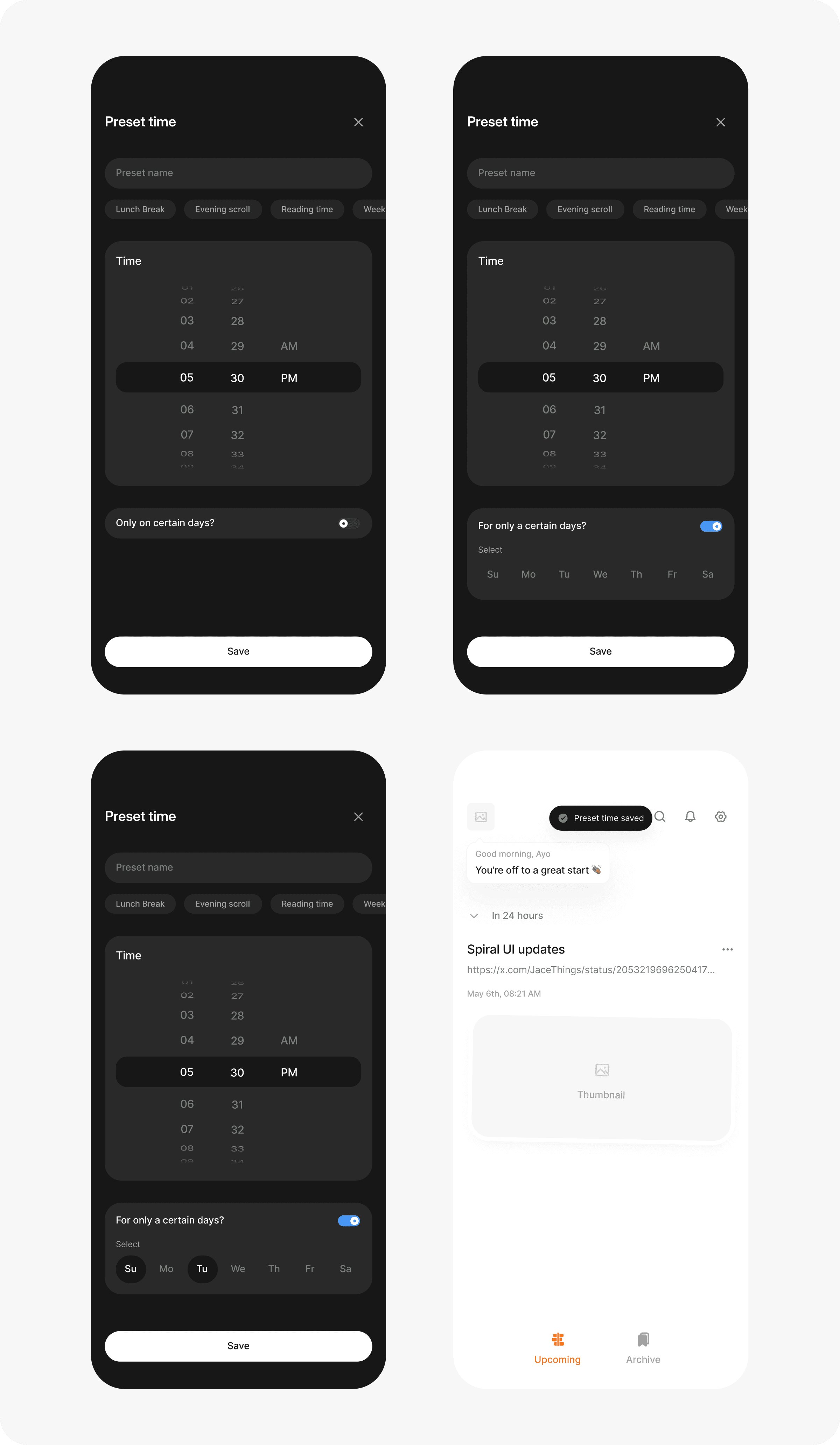
Preset times instead of a date picker
Picking a date and time for every single reminder is exactly the kind of friction that makes people abandon a save-for-later app in week one. Preset times; lunch break, reading time, and a couple of others, turn "set a reminder" into a single tap. The date picker still exists for the person who wants it, it's just not the default path anymore.

Folders for the stuff whose time has passed
Not everything gets read on schedule. When a reminder period lapses, the content doesn't vanish into the void it moves into the archived. You can create folders to categories does content in the archive.

UI sample
Some UI from the mobile app


Conclusion
What was learnt
I'd validate the share-sheet workflow against a wider variety of real-world content much earlier in the design process.
The assumption was that "if it can be shared, Recall can save it." That proved true for most content, but edge cases like screenshots without links, forwarded voice notes, and certain app-specific content exposed limitations that should have been explored sooner.
Those edge cases didn't invalidate the concept, but they highlighted where the experience needs to evolve beyond simply handling shared links.
If you're building products that requires thoughtful design, I'd love to talk.